Linux workstation
Step 1
- Copy all your data to an external drive.
- If you use Thunderbird copy the programdata to an external drive.
- If you use Firefox make an account for synchronisation between devices.
If you don't use thunderbird for email install it and migrate your e-mail to it and check that it works. Than copy the programdata to the external drive.
If you don't use Firefox install it and make it you primary browser. Copy bookmarks to it. Create the firefox-account for synchronisation between devices.
Step 2
Creating install drive
Create the Ventoy boot-drive. Use a 32 MB if you want several ISO's.
Download Linux Mint cinnamon and copy the ISO to the Ventoy-drive.
Step 3
Try to boot from your USB-drive. If this works goto step 4.
When the PC has Windows 11 installed this will not work. That's normal.
Open BIOS setup and disable security settings that disable insecure booting.
Save and exit. Reboot the PC with the Ventoy-drive.
Step 4
Run live version
When the Ventoy menu is shown choose Linux Mint and run the live version to test if things work.
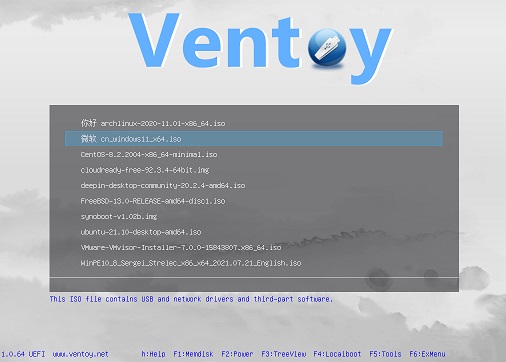
If you want you can test several distro's in this way.
If you want a distro thats close to windows desktop - Windows 7 - Linux Mint Cinnamon your choice.
Step 5
Installing
Click on install Linux Mint icon to install the distro.
When the installer is active, choose the option to use the entire drive. All data will be destroyed. Follow the instructions.
Do NOT encrypt the home directory is more than one user must use the workstation.
If all you choices are OK the click on install. The drive will be repartioned en formatted. There are now two partitions, the /boot/ and / directory.
When ready reboot the system without the USB-drive if it didn't reboot by itself.
Run updates
Right-under there is a shield icon, witch shows if there are updates. When there are - there is a orange dot - you can click on it and install the updates.

Step 6
Install the apps you need.
Firefox - the default browser - and LibreOffice - the alternative for MS-office and OpenOffice.org - are already installed. Thunderbird must be installed first for e-mail.
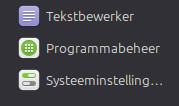
Click on the middle icon to go to the app-installer.
Step 7
Install printers
Install the network printers that are in your network. Use the lowest icon in the above picture.
You can also install an PDF-printer. LibreOffice has a save as PDF option.